WebVerse - Tricky Tunnels

Lab: Tricky Tunnels (WebVerse) — FastAPI Debug Endpoint Info Disclosure Walkthrough
Difficulty: Easy
Theme: Unauthenticated debug endpoint leaking sensitive configuration (information disclosure / sensitive data exposure)
Goal: Obtain the flag by enumerating exposed API routes and abusing an internal config leak
Entry: http://localhost:8088
TL;DR
Tricky Tunnels is an easy WebVerse web/API security lab focused on a very real bug class: an unauthenticated internal debug endpoint that leaks sensitive configuration.
The solve path is straightforward:
- Load the app at
http://localhost:8088 - Perform basic recon on
robots.txt,/api/v1/health, and the FastAPI docs - Use the breadcrumb to discover the API spec at
/openapi.json(or browse/docs) - Enumerate the exposed internal route:
GET /internal/config - Request it with no authentication and extract the flag from the leaked JSON
This is a classic information disclosure vulnerability that can also expose secrets like JWT keys, internal URLs, and debug values.
Setup Notes
This lab is intentionally simple to launch and test. There are no custom hostnames or subdomains for Tricky Tunnels — WebVerse runs it directly on localhost.
Open the lab in your browser:
http://localhost:8088
Recon: Enumerating the Web and API Surface
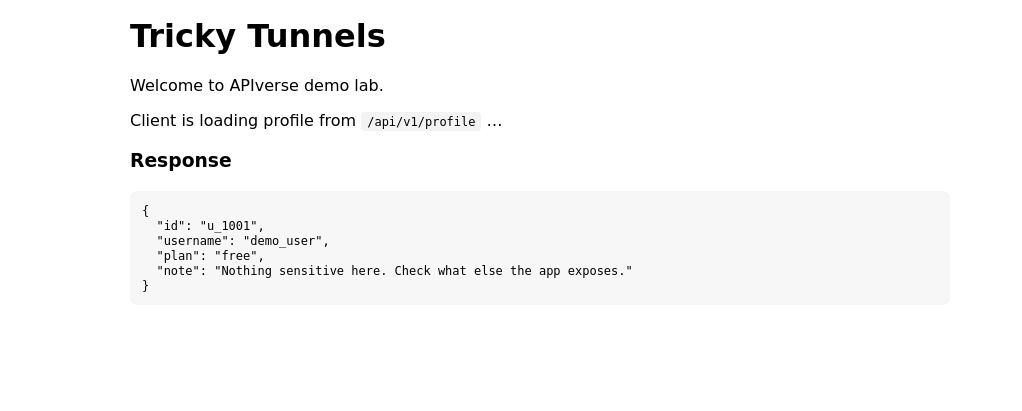
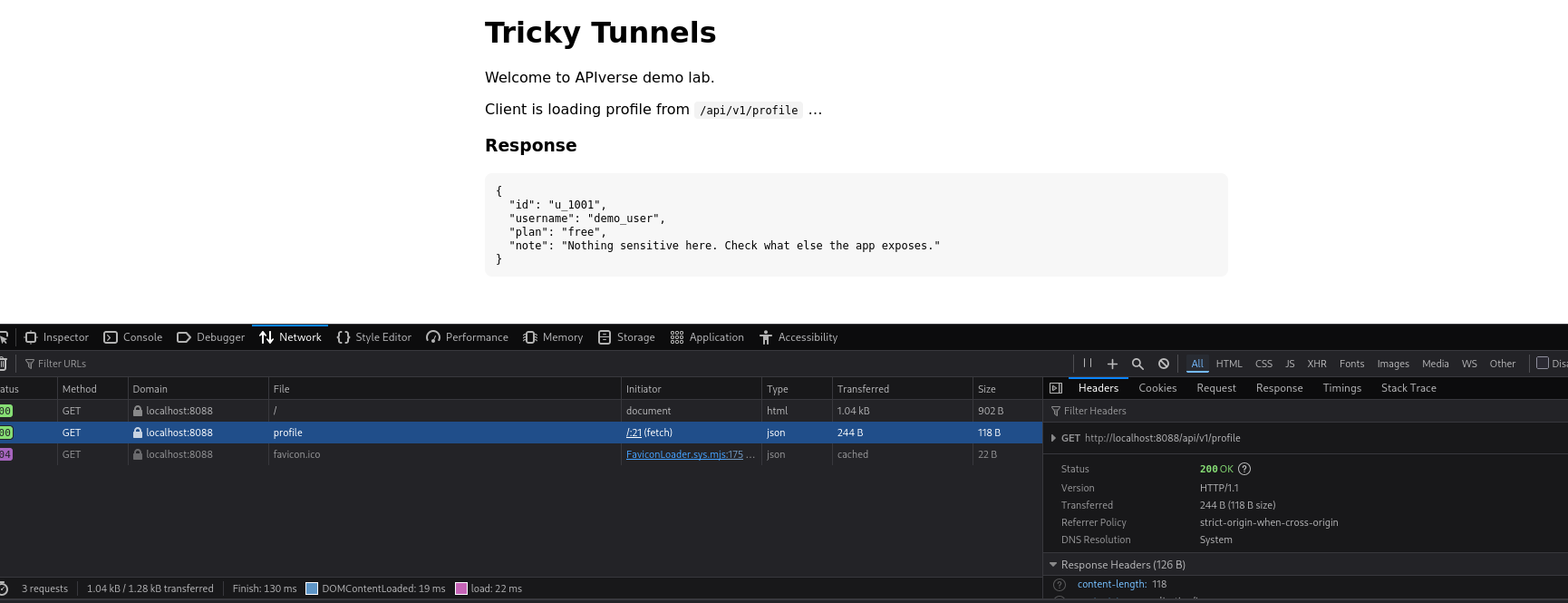
The landing page is intentionally “thin client” style, which is a good clue for web/API testing because it exposes how the frontend talks to the backend.
Right away, it reveals:
- API base:
/api/v1 - Profile request path:
/api/v1/profile
That gives us an immediate recon starting point. Before touching Burp intruder or guessing hidden routes, I map the obvious HTTP surface first:
GET /GET /api/v1/profileGET /api/v1/healthGET /robots.txt
This kind of basic endpoint enumeration is often enough to find a foothold in beginner and intermediate web labs.
Quick Win: robots.txt Is a Recon Source, Not Access Control
Start with:
http://localhost:8088/robots.txt
This is a classic web security recon step. In real applications, robots.txt sometimes leaks internal path names, admin panels, staging routes, or debug paths that developers assumed “nobody would check.”
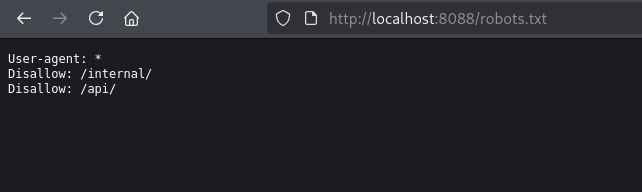
In Tricky Tunnels, it points directly at:
/internal/
That is not security — it’s just a breadcrumb. robots.txt can hide pages from search engines, but it does not restrict access.
At this point, the question becomes:
What internal endpoints are exposed under /internal/, and are they actually protected?
Recon Breadcrumb: /api/v1/health Leaks the OpenAPI Spec Location
Next, hit the health endpoint:
GET /api/v1/health
This response contains a subtle but very useful recon clue: a Link header that points to the API description document:
/openapi.json
That means you do not need to guess endpoint names manually. You can pull the API spec and enumerate routes directly — which is exactly what an attacker would do against an exposed FastAPI app.
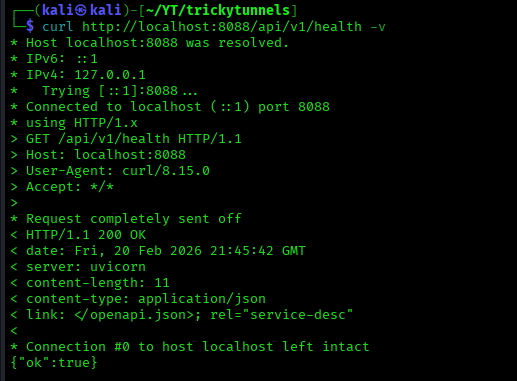
Request the health route:
curl -v 'http://localhost:8088/api/v1/health'
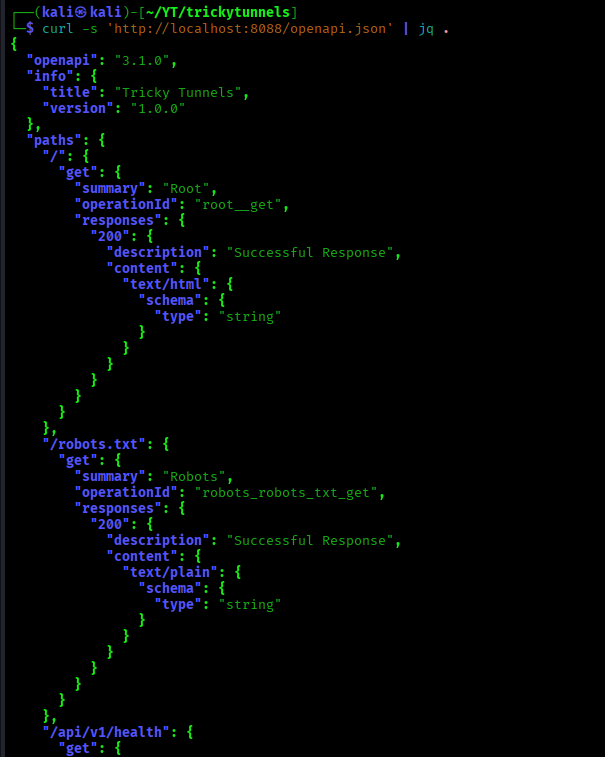
Then fetch the OpenAPI schema:
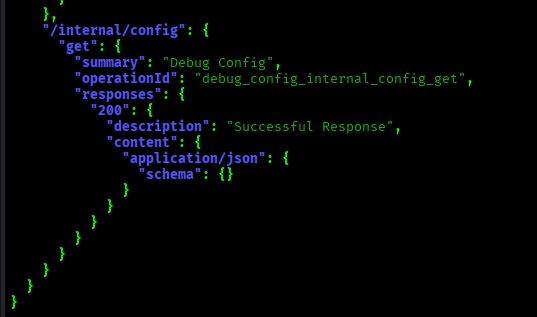
curl -s 'http://localhost:8088/openapi.json' | jq .
If you search the JSON for internal, the vulnerable route stands out immediately.
This is a great example of how OpenAPI exposure + weak internal route protection can combine into an easy exploit chain.
Alternative Recon Path: FastAPI Swagger UI (/docs)
FastAPI exposes interactive Swagger docs by default at:
http://localhost:8088/docs
If /openapi.json is the machine-readable API map, /docs is the human-friendly version. For testing and learning, it’s incredibly useful. In production, though, leaving Swagger docs exposed can significantly reduce attacker effort during reconnaissance.
In Tricky Tunnels, opening /docs effectively gives you a menu of available endpoints, including the internal diagnostic route.
So even if you skipped robots.txt or didn’t inspect the health response, FastAPI Swagger UI still gives you a clean path to the same vulnerability.
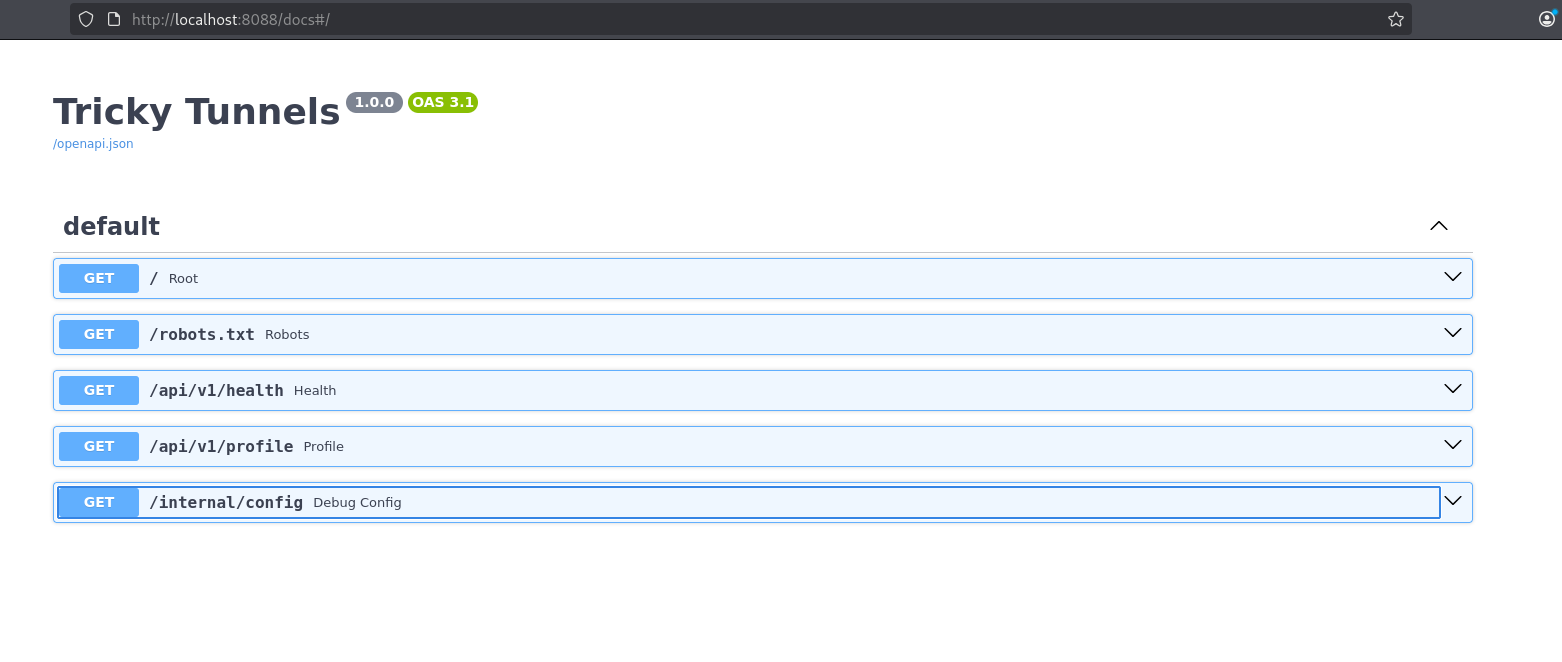
The Vulnerability: Unauthenticated Internal Config Endpoint (Information Disclosure)
The vulnerable endpoint is:
GET /internal/config
And the problem is simple but severe:
- No authentication required
- No authorization checks
- No internal-only network restriction
- No redaction of sensitive values
It returns a full configuration dump to any user who can reach the app.
Request it directly:
curl -s 'http://localhost:8088/internal/config' | jq .
The response includes a JSON object with app/runtime data — and, critically, sensitive configuration values that should never be public, including:
- secrets (such as a JWT secret)
- the lab flag
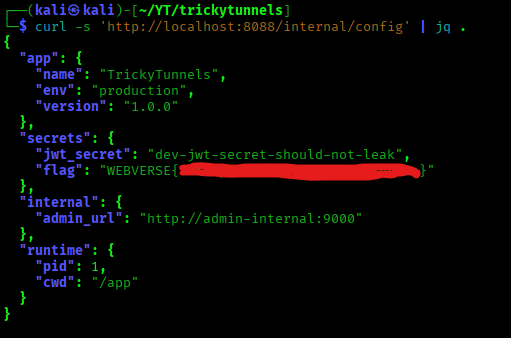
This is a textbook sensitive information disclosure issue caused by an exposed debug/diagnostic endpoint. In real systems, this kind of bug can lead to account takeover, token forgery, internal service access, or full environment compromise depending on what gets leaked.
Getting the Flag from the Leaked JSON
Once the internal config endpoint is identified, extracting the flag is trivial.
Use jq to pull it directly from the secrets object:
curl -s 'http://localhost:8088/internal/config' | jq -r '.secrets.flag'

That completes the Tricky Tunnels exploit chain:
robots.txt/ health endpoint breadcrumbs- OpenAPI or Swagger docs exposure
- discovery of
/internal/config - unauthenticated config leak
- flag extraction from leaked secrets
It’s a short chain, but it mirrors a very realistic API security misconfiguration + debug endpoint exposure scenario.
Wrap-Up: What Tricky Tunnels Teaches About API Security
Tricky Tunnels is an easy lab, but it teaches a high-value real-world API security lesson: exposed internal diagnostics can turn a small recon clue into a full sensitive data leak.
Key takeaways
- Debug endpoints are dangerous when exposed
Config dumps often contain JWT secrets, API keys, internal URLs, credentials, and feature flags. robots.txtis not a security control
It can leak internal route names and help attackers focus their enumeration.- OpenAPI and Swagger docs can become an attack surface
/openapi.jsonand/docsare great for developers, but they also make recon dramatically easier if left public.
Exploit chain recap
Recon breadcrumbs → API spec / Swagger docs → internal diagnostic endpoint discovery → unauthenticated config leak → flag
Real-world defense tips (the “fix” side)
- Disable or gate
/docsand/openapi.jsonin production - Never expose debug/config dump routes to public users
- Require auth + authorization for any operational/diagnostic endpoints
- Redact secrets from all API responses and logs
- Restrict internal endpoints at the reverse proxy or network layer
FAQ: Tricky Tunnels, FastAPI Docs Exposure, and Debug Endpoint Leaks
What is the vulnerability in Tricky Tunnels?
Tricky Tunnels demonstrates an unauthenticated internal debug/config endpoint exposure (a form of information disclosure / sensitive data exposure).
The vulnerable route (/internal/config) returns sensitive configuration data without requiring authentication, which can include secrets such as JWT keys and the lab flag.
Why is exposing /internal/config dangerous?
Internal config endpoints are dangerous because they often leak:
- JWT secrets
- API keys
- Internal service URLs
- Debug flags
- Credentials or tokens
- Environment-specific settings
In real applications, a config leak like this can lead to token forgery, account takeover, or deeper compromise — not just information disclosure.
Is robots.txt a security feature?
No. robots.txt is not a security control.
It can tell search engines which paths not to crawl, but it does not block attackers from visiting those paths directly. In many cases, robots.txt becomes a recon source that leaks internal route names like /admin/, /staging/, or /internal/.
Why are FastAPI /docs and /openapi.json risky when exposed?
FastAPI’s /docs (Swagger UI) and /openapi.json (OpenAPI schema) are extremely useful for development and testing, but they also make attacker reconnaissance much easier if exposed publicly.
They can reveal:
- endpoint paths
- request methods
- parameter names
- expected request bodies
- internal route names
If an app also has weak auth or exposed debug endpoints, the API docs can make exploitation much faster.
What does Tricky Tunnels teach beginners in web/API security?
Tricky Tunnels teaches a very practical beginner workflow:
- do basic recon first (
/,robots.txt, health endpoints) - inspect headers and docs exposure
- enumerate API routes using OpenAPI/Swagger
- test internal endpoints for auth and data exposure
- extract high-value secrets from leaked JSON
It’s a great intro to API reconnaissance and debug endpoint misconfigurations.
How do you secure internal diagnostic endpoints in production?
Some common defenses:
- Disable debug/config endpoints entirely in production
- Require authentication and authorization for operational endpoints
- Restrict access by network (internal-only, VPN-only, allowlist)
- Redact secrets from all API responses and logs
- Disable or gate
/docsand/openapi.jsonunless needed - Review reverse proxy rules to ensure internal paths are not exposed
Can I practice labs like Tricky Tunnels online?
Yes — you can practice labs like Tricky Tunnels and other WebVerse web/API security labs on webverselabs.com.
If you’re learning web hacking, API security, broken authorization, or information disclosure bugs, WebVerse is built specifically for hands-on practice with realistic exploit chains.
Is Tricky Tunnels a FastAPI lab?
Yes — Tricky Tunnels uses a FastAPI-style setup, which is why endpoints like /docs and /openapi.json are part of the recon path in the walkthrough.
That makes it especially useful for learning how FastAPI API documentation exposure can contribute to real-world attack chains.